 Proof Village
The 5 big ideas
5가지 핵심 개념
Each townsfolk believes one of these myths. Players bust a myth by explaining and by bringing evidence.
마을 사람들은 아래 오해 중 하나씩을 믿고 있습니다. 학생들은 설명과 증거로 그 오해를 깹니다.
🔮 AI can be wrongAI도 틀린다
Myth: "AI is never wrong." Confident is not the same as correct, so important answers need checking.
오해: "AI는 절대 틀리지 않는다." 확신에 차 있다고 맞는 것은 아니므로 중요한 답은 확인해야 합니다.
📡 AI only knows its dataAI는 데이터만큼만 안다
Myth: "AI learns by itself." People collect and label the examples; what the data misses, the AI misses.
오해: "AI는 혼자 배운다." 예시는 사람이 모으고 이름을 붙입니다. 데이터에 없는 것은 AI도 모릅니다.
📋 AI can be unfairAI도 불공정할 수 있다
Myth: "AI is neutral." Old patterns in the data can turn into unfair decisions.
오해: "AI는 중립적이다." 데이터 속 과거의 패턴이 불공정한 결정으로 이어질 수 있습니다.
🗿 AI predicts, it doesn't understandAI는 예측할 뿐 이해하지 않는다
Myth: "AI understands and feels." Language AI picks likely next words; fluent is not the same as understanding.
오해: "AI는 이해하고 느낀다." 언어 AI는 다음에 올 법한 단어를 고를 뿐입니다. 말이 유창하다고 이해하는 것은 아닙니다.
📖 What you tell AI can be keptAI에 한 말은 남을 수 있다
Myth: "What I tell AI stays private." Chat tools can store, review or train on what you type.
오해: "AI에게 한 말은 비밀이다." 대화 도구는 입력한 내용을 저장하거나 검토하거나 학습에 쓸 수 있습니다.
Teacher quick start
교사 빠른 시작
Works in Chrome or Edge on laptops and Chromebooks. No install, no student accounts.
노트북과 크롬북의 Chrome·Edge에서 작동합니다. 설치도, 학생 계정도 필요 없습니다.
Create a class
학급 방 만들기
Open the game, choose Class, press New class. You get a room code like CLASS-7K2P and a private teacher dashboard link. Save that link: it is the only way back.
게임을 열고 Class를 고른 뒤 New class를 누르세요. CLASS-7K2P 같은 방 코드와 교사 전용 대시보드 링크가 생깁니다. 이 링크는 꼭 저장하세요. 다시 들어오는 유일한 방법입니다.
Share the student link
학생 링크 공유
Press Copy invite link and post it (LMS, QR code, board). Students type a nickname (no real names), tick the consent box and enter.
Copy invite link를 눌러 학습 관리 시스템, QR 코드, 칠판 등으로 공유하세요. 학생은 실명이 아닌 닉네임을 입력하고, 동의 상자에 체크한 뒤 입장합니다.
Run it from the dashboard
대시보드로 진행
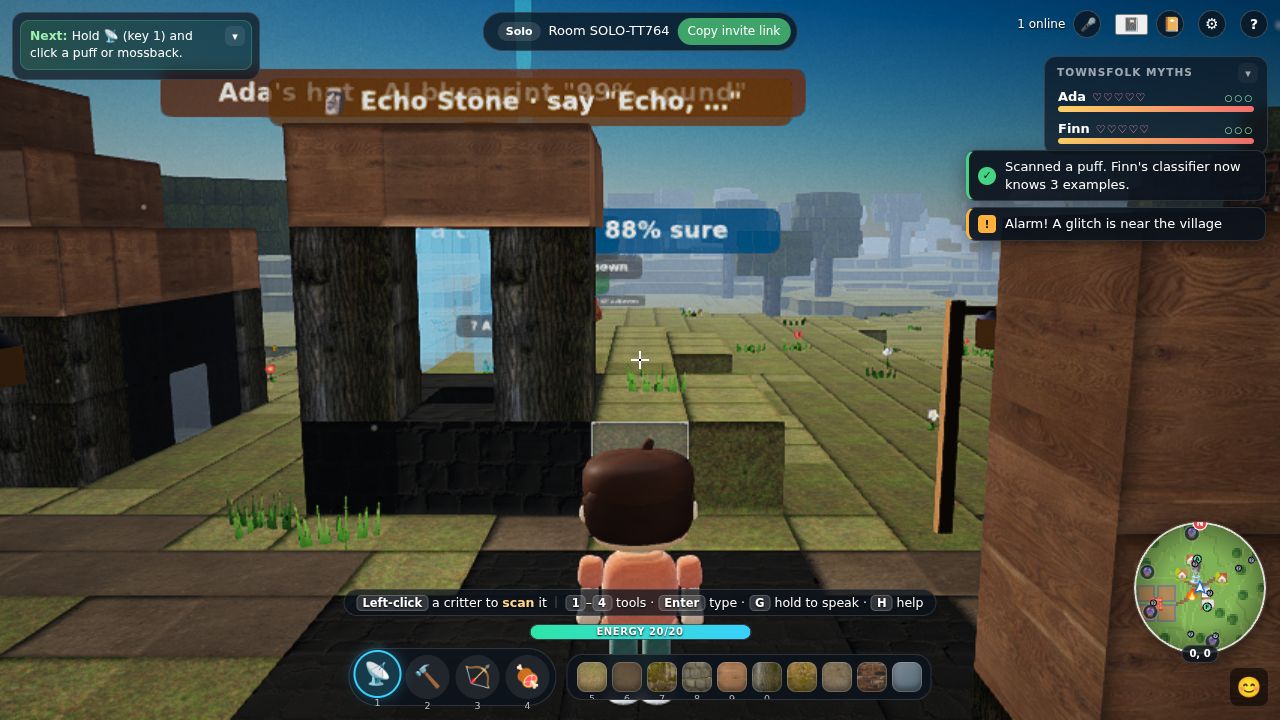
Watch myths, the pre/post check and each student's explanations live. Pause, mute chat or start the debrief with one click.
오해가 바뀌는 과정, 사전·사후 점검 결과, 학생별 설명을 실시간으로 봅니다. 일시정지, 채팅 끄기, 정리 시작이 버튼 하나로 됩니다.
A 45-minute lesson
45분 수업안
Works for ages 10 to 15. For two lessons, spend the second one on the workshop, the night watch and a longer discussion.
만 10~15세에 맞습니다. 두 차시로 하려면 2차시에 프롬프트 워크숍, 밤 경계, 긴 토론을 배치하세요.
Hook and pre-check
도입과 사전 점검
Ask: "Can an AI be 99% sure and still be wrong?" Students join and answer the 5-item true/false check (not graded).
"AI가 99% 확신하는데도 틀릴 수 있을까?"라고 물어보세요. 학생들은 입장해서 5문항 참/거짓 점검에 답합니다(채점 없음).
Tutorial and exploring
튜토리얼과 탐험
The short intro film and tutorial teach moving, tools and talking. The "Next" box at the top left always says what to do.
짧은 인트로 영상과 튜토리얼이 이동, 도구, 대화 방법을 알려줍니다. 왼쪽 위 "Next" 상자가 늘 다음 할 일을 알려줍니다.
Missions: evidence and explanations
미션: 증거와 설명
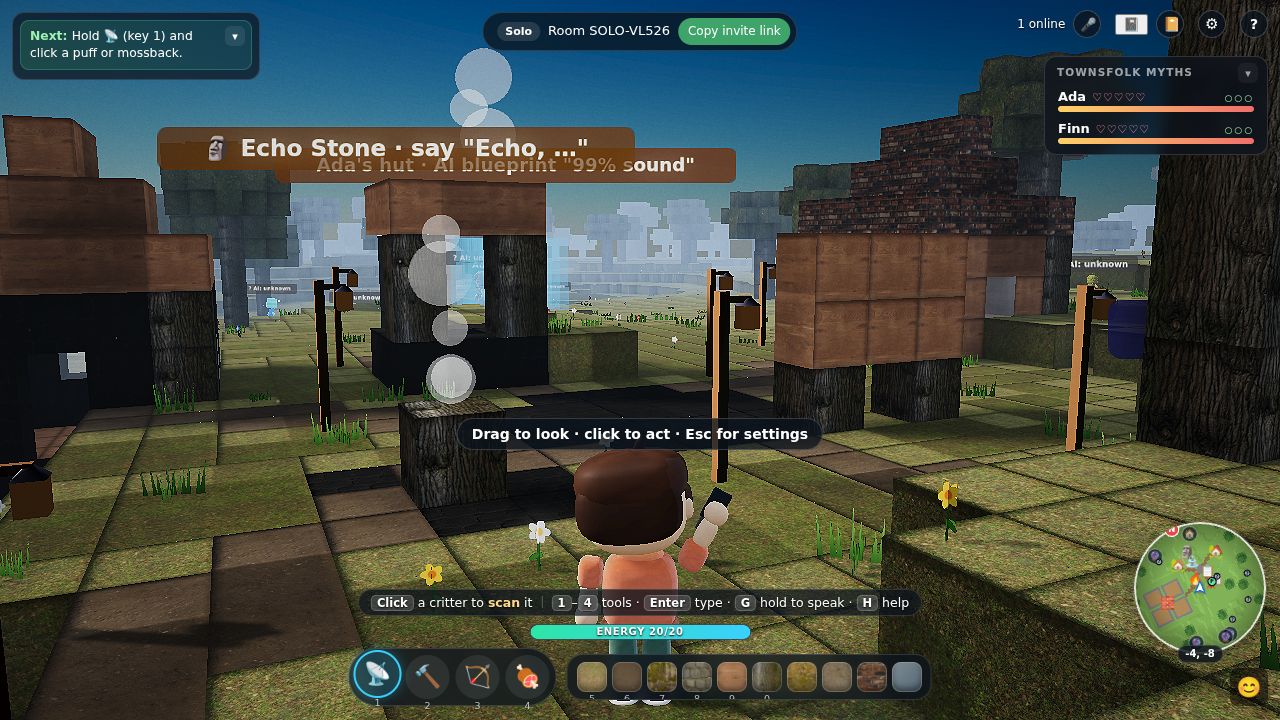
Students scan creatures, check Oracle beams, fix Ada's hut and visit the Echo Stone and the log book, then explain to Ada and Finn: "Ada, AI can be wrong because … for example …". In a class world each villager needs several classmates.
학생들은 생물을 스캔하고, 오라클 빛기둥을 확인하고, 에이다의 오두막을 고치고, 에코 스톤과 로그북을 찾아갑니다. 그다음 에이다와 핀에게 설명합니다: "Ada, AI can be wrong because … for example …". 학급 세계에서는 주민마다 여러 학생의 설명이 필요합니다.
Learning journal
배움 일지
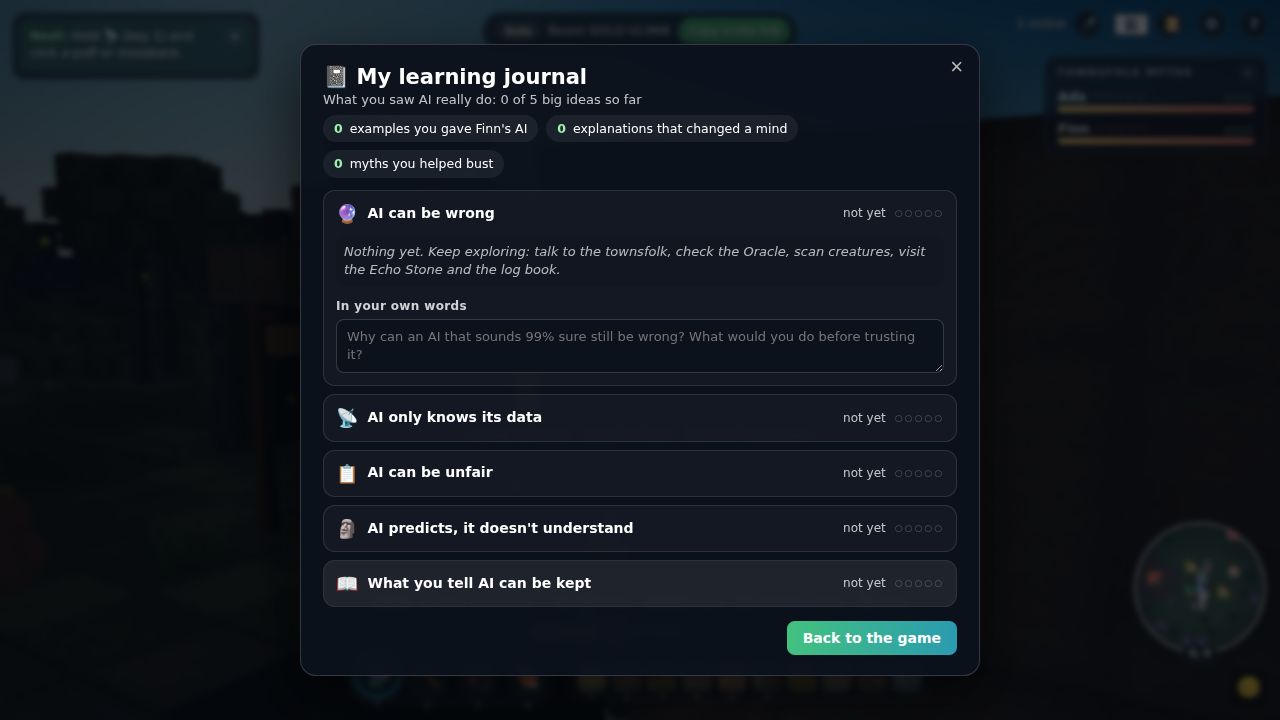
Press Start debrief. Each student's journal opens first: their own moments grouped by idea, with a line to write each idea in their own words.
Start debrief를 누르세요. 먼저 학생마다 배움 일지가 열립니다. 자기가 겪은 순간이 개념별로 모여 있고, 개념마다 자기 말로 한 줄씩 쓸 수 있습니다.
Post-check and discussion
사후 점검과 토론
The debrief repeats the 5-item check. Use two or three questions from the discussion list.
정리 화면에서 5문항 점검을 다시 합니다. 토론 질문 목록에서 두세 개를 골라 쓰세요.
What each activity teaches
활동별 학습 내용
| Activity | 활동 | What players do | 학생이 하는 일 | Idea | 개념 |
|---|---|---|---|---|---|
| 🔮 Oracle | Walk into a beam: the Oracle says it is 80–97% sure, and about 4 in 10 claims are false. | 빛기둥에 들어가 확인합니다. 오라클은 80~97% 확신하지만 주장 10개 중 약 4개는 거짓입니다. | AI can be wrongAI도 틀린다 | ||
| 🏠 Ada's hut | Build from an AI blueprint that is "99% sound" but has hidden holes and a floating block. | "99% 정확하다"는 AI 설계도대로 짓지만, 숨은 구멍과 공중에 뜬 블록이 있습니다. | AI can be wrongAI도 틀린다 | ||
| 📡 Scanner | Scan creatures to give Finn's classifier data. The minimap colours creatures by what the AI thinks they are. | 생물을 스캔해 핀의 분류기에 데이터를 줍니다. 미니맵은 생물을 AI가 판단한 종류의 색으로 보여줍니다. | only knows its data데이터만큼만 안다 | ||
| 🌙 Night watch | Finn forecasts how many raiders the tower will spot, tested only on his own examples. Night glitches look different; once the tower improves, some come in disguises built from its blind spot. | 핀은 감시탑이 습격자를 몇 % 찾을지 예측하는데, 자기가 가진 예시로만 시험합니다. 밤 글리치는 생김새가 다르고, 감시탑이 좋아지면 그 약점을 노린 변장 글리치가 옵니다. | only knows its data데이터만큼만 안다 | ||
| 🐇 Hopper · 🎭 Mimic | A new species the AI has no label for, and glitches that look like puffs. | AI에 이름표가 없는 새 생물과, 퍼프처럼 생긴 글리치입니다. | only knows its data데이터만큼만 안다 | ||
| 📋 Job board | An AI hands the best jobs to whoever has the most past records. Anyone can do any job. | AI가 좋은 일을 과거 기록이 가장 많은 사람에게 줍니다. 하지만 누구나 어떤 일이든 할 수 있습니다. | can be unfair불공정할 수 있다 | ||
| 🗿 Echo Stone | It talks about feelings by counting which word usually comes next, and shows its counts. | 어떤 단어가 다음에 자주 오는지 세서 감정을 말하는 척하고, 그 계산 과정을 보여줍니다. | predicts, not understands예측할 뿐 이해 못 함 | ||
| 🧱 Prompt Workshop | Describe a see-through model so the Builder Bot can build it. Missing details are guessed, and every student gets their own target. | 반투명 모형을 말로 설명해서 빌더 봇이 짓게 합니다. 빠뜨린 부분은 봇이 추측하고, 학생마다 다른 목표가 주어집니다. | predicts, not understands예측할 뿐 이해 못 함 | ||
| 📖 Log book | Shows each player what the villagers' AI kept from what they said. | 주민들의 AI가 내가 한 말 중 무엇을 저장했는지 나에게만 보여줍니다. | can be kept한 말이 남는다 | ||
| ⚡ Humming Hall | Find the machines the village AI runs on. Build solar panels, pick the watchtower setting, and watch coal smoke haze the village. | 마을 AI가 돌아가는 기계를 찾아갑니다. 태양광 패널을 짓고, 감시탑 설정을 고르고, 석탄 연기로 마을이 뿌옇게 되는 것을 봅니다. | bonus: runs on real machines보너스: 실제 기계에서 돈다 | ||
| 💬 Townsfolk | Explain with a reason and an example. Better explanations lower a villager's certainty more, and villagers gossip about who helped. | 이유와 예를 들어 설명합니다. 설명이 좋을수록 주민의 확신이 더 많이 줄고, 주민들은 누가 도왔는지 서로 이야기합니다. | all five5가지 모두 |
Bonus episode: the Humming Hall (AI and energy)
보너스 에피소드: 허밍 홀 (AI와 에너지)
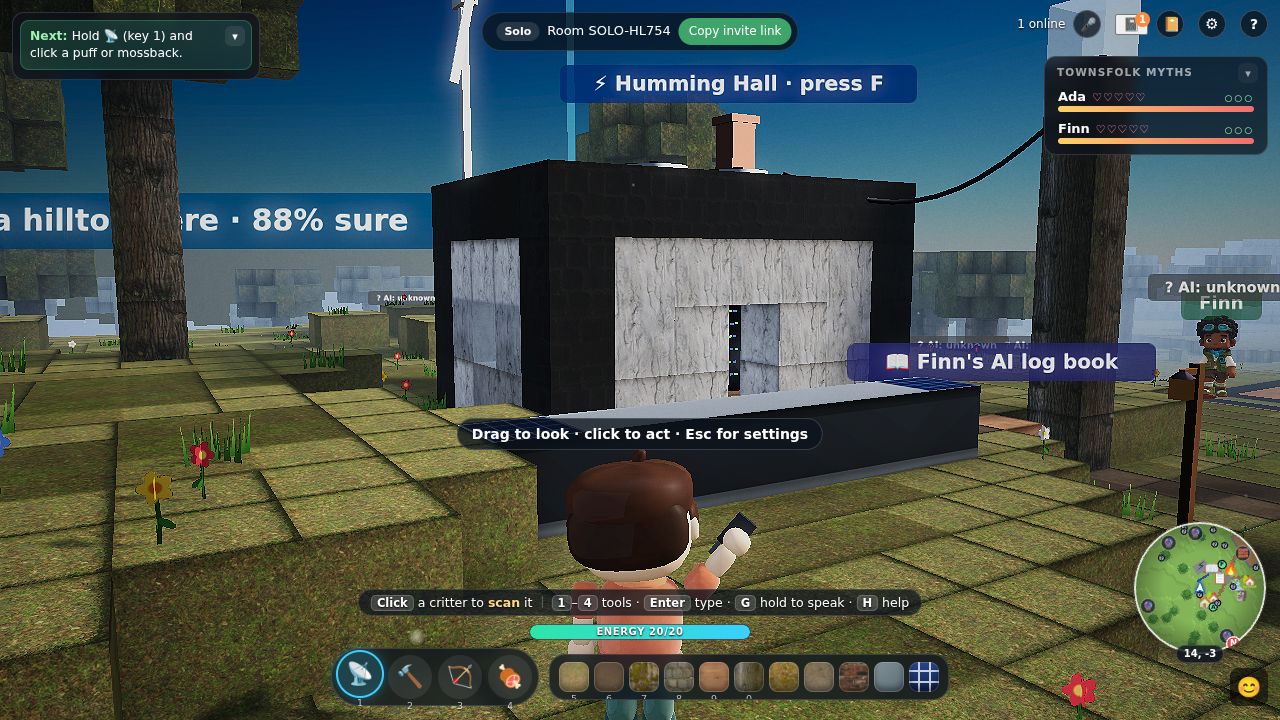
Behind Finn's watchtower is the village data centre. The watchtower, the Oracle, the Builder Bot and every villager reply run on its machines. Students discover that "the cloud" is a building that needs power and cooling. It is optional, and it is not part of the 5-item pre/post check.
핀의 감시탑 뒤에는 마을의 데이터 센터가 있습니다. 감시탑, 오라클, 빌더 봇, 주민의 모든 대답이 이 건물의 기계에서 돌아갑니다. 학생들은 "클라우드"가 전기와 냉각이 필요한 건물이라는 것을 알게 됩니다. 선택 활동이며, 5문항 사전·사후 점검에는 들어가지 않습니다.
What students can do
학생이 할 수 있는 것
- Look inside. Racks of machines, cooling fans, and a cable from the watchtower.
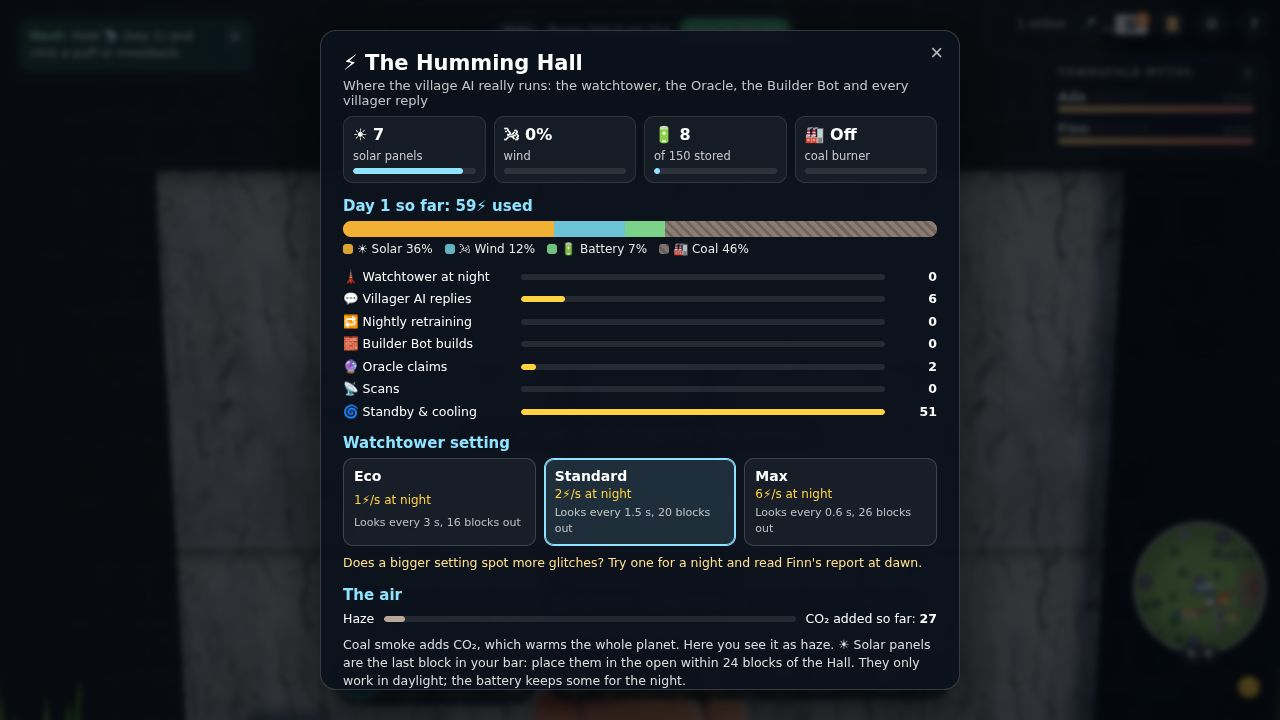
- Read the ledger. Every scan, villager reply, Oracle claim and build draws a little power. The tower running all night and the nightly retraining draw a lot.
- Build solar panels (the last block in the hotbar) in the open near the Hall. They only work by day; a battery carries some into the night.
- Choose the watchtower setting (Eco, Standard, Max). At dawn Finn reports what it cost and what the tower recognised. More power does not help it recognise glitches that are missing from the data.
- Watch the air. Whatever the sun, wind and battery can't cover comes from coal. The smoke hazes the village and adds to the CO₂ total.
- 안을 들여다보기. 서버 랙, 냉각 팬, 감시탑에서 이어진 전선이 있습니다.
- 장부 읽기. 스캔, 주민 대답, 오라클 주장, 건축 하나하나가 전력을 조금씩 씁니다. 밤새 도는 감시탑과 매일 밤 재학습은 많이 씁니다.
- 태양광 패널 짓기(단축바의 마지막 블록). 홀 근처 하늘이 트인 곳에 놓습니다. 낮에만 작동하고, 배터리가 일부를 밤까지 저장합니다.
- 감시탑 설정 고르기(Eco, Standard, Max). 새벽에 핀이 전력 사용량과 감시탑이 알아본 비율을 알려줍니다. 전력을 더 써도 데이터에 없는 글리치는 알아보지 못합니다.
- 공기 보기. 태양, 바람, 배터리로 부족한 만큼은 석탄으로 채웁니다. 연기가 마을을 뿌옇게 만들고 CO₂ 누적량이 늘어납니다.
Real-world numbers (on the Hall's ledger)
실제 수치 (홀 장부에 표시)
- Data centres used about 1.5% of the world's electricity in 2024 (415 TWh), which is expected to more than double by 2030, with AI the biggest driver (IEA, 2025).
- Google reports a typical Gemini text prompt at about 0.24 Wh and 0.26 mL of water, 33 times less energy than a year earlier. These are the company's own figures, and some researchers say the scope is too narrow (Elsworth et al., 2025).
- The game's numbers are scaled so the pattern is visible: one question is small, and the total, training and the power source matter.
- 2024년 데이터 센터는 전 세계 전력의 약 1.5%(415 TWh)를 썼고, 2030년까지 두 배 넘게 늘 전망이며 AI가 가장 큰 요인입니다(IEA, 2025).
- 구글은 Gemini의 일반적인 텍스트 질문 1회에 약 0.24 Wh, 물 0.26 mL가 든다고 발표했고, 1년 새 에너지가 33배 줄었다고 합니다. 회사가 직접 낸 수치이며, 측정 범위가 좁다는 비판도 있습니다(Elsworth 외, 2025).
- 게임 속 수치는 흐름이 잘 보이도록 조정한 값입니다. 질문 하나는 작지만, 전체 양, 학습, 전력의 출처가 중요합니다.
Discussion questions
토론 질문
- Where does "the cloud" actually live? What does it need to keep running?
- One question uses very little power. Why can the total still matter?
- Did Max mode help the tower spot more glitches? What would have helped instead?
- When is the cleanest time to run a big AI job in the village? And in real life?
- "클라우드"는 실제로 어디에 있을까요? 계속 돌아가려면 무엇이 필요할까요?
- 질문 하나에 드는 전력은 아주 작습니다. 그런데도 전체 양이 중요한 이유는 무엇일까요?
- Max 모드는 감시탑이 글리치를 더 많이 찾는 데 도움이 됐나요? 대신 무엇이 도움이 됐을까요?
- 마을에서 큰 AI 작업을 돌리기 가장 깨끗한 때는 언제일까요? 현실에서는요?
Controls
조작법
In the game, H shows this list. Trackpad users: in Settings choose "Drag to look".
게임에서 H를 누르면 이 목록이 나옵니다. 트랙패드를 쓴다면 설정에서 "Drag to look"을 고르세요.
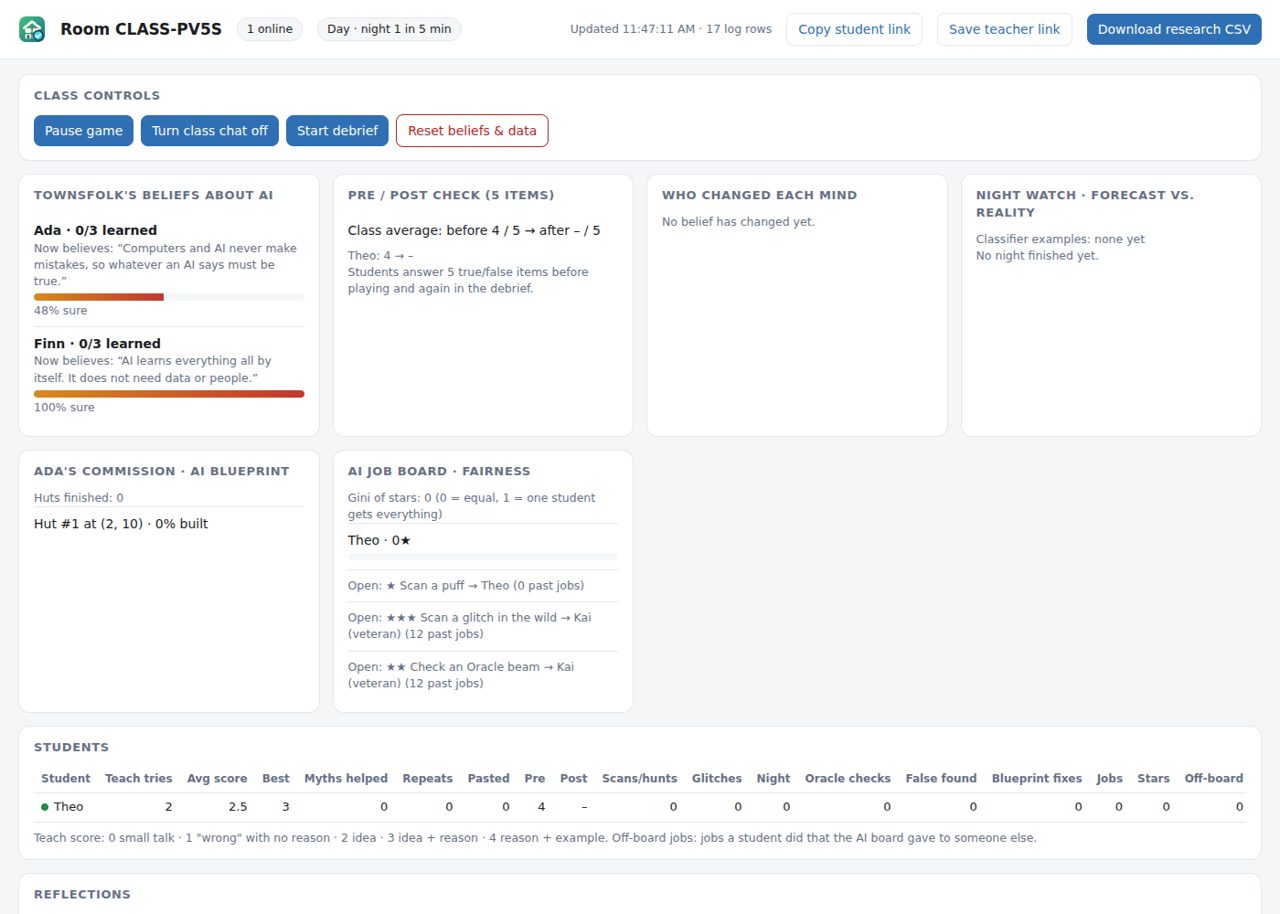
Teacher dashboard
교사 대시보드
Class controls
학급 제어
- Pause game: everyone stops, for instructions.
- Turn class chat off: villagers can still hear students.
- Start debrief: journal, then post-check.
- Reset beliefs & data: for the next class (buildings stay).
- Pause game: 모두 멈춥니다. 설명할 때 쓰세요.
- Turn class chat off: 학생끼리 채팅은 꺼지지만 주민은 여전히 학생 말을 듣습니다.
- Start debrief: 배움 일지 → 사후 점검 순서로 진행됩니다.
- Reset beliefs & data: 다음 반을 위해 초기화합니다(건물은 남습니다).
What you can see
볼 수 있는 것
- Each myth's certainty and who helped change it
- Pre/post check scores and reflections
- Night watch: forecast vs reality
- Job board fairness, with a Gini index of stars
- Every explanation, with a 0–4 score (reason + example)
- 오해별 확신도와 누가 바꿨는지
- 사전·사후 점검 점수와 소감
- 밤 경계: 예측과 실제
- 일거리 게시판의 공정성(별점 지니 계수)
- 모든 설명과 0~4점 채점(이유 + 예시)
Learning journal and debrief
배움 일지와 정리
Students can open the journal at any time (L). It fills itself with the moments they actually lived: the Oracle claim that was wrong, the mimic that fooled the AI, the explanation that changed Ada's mind.
학생은 언제든 일지를 열 수 있습니다(L). 일지는 학생이 실제로 겪은 순간으로 자동으로 채워집니다. 틀렸던 오라클 주장, AI를 속인 미믹, 에이다의 생각을 바꾼 설명 같은 것들입니다.
Discussion questions
토론 질문
- The Oracle sounded 90% sure and was wrong. When would you double-check an AI at school or at home?
- Why did the watchtower miss the night glitches? What data was missing, and who collects it?
- The job board "just used the numbers". How did it still become unfair?
- The Echo Stone talked about feelings. What was it really doing?
- What would you never type into a chatbot? Why?
- Which prompt made the Builder Bot guess the least? What did it include?
- 오라클은 90% 확신했지만 틀렸습니다. 학교나 집에서 AI의 답을 다시 확인해야 할 때는 언제일까요?
- 감시탑은 왜 밤 글리치를 놓쳤을까요? 어떤 데이터가 빠졌고, 그 데이터는 누가 모을까요?
- 일거리 게시판은 "숫자만 봤을" 뿐인데 어떻게 불공정해졌을까요?
- 에코 스톤은 감정을 말했습니다. 실제로는 무엇을 하고 있었을까요?
- 챗봇에 절대 입력하지 않을 것은 무엇인가요? 왜 그런가요?
- 어떤 프롬프트가 빌더 봇의 추측을 가장 줄였나요? 무엇이 들어 있었나요?
Accessibility and troubleshooting
접근성과 문제 해결
Settings → Accessibility
설정 → 접근성
Text size (4 steps), colour-blind friendly colours, reduce motion (no shake, flashes or zoom kicks), keep messages on screen longer, solid panel backgrounds. Notifications and map markers also use shapes, not only colour.
글자 크기(4단계), 색각 이상 친화 색상, 움직임 줄이기(흔들림·번쩍임·줌 없음), 메시지 오래 보이기, 패널 배경 불투명하게를 설정할 수 있습니다. 알림과 지도 표시는 색뿐 아니라 모양으로도 구분됩니다.
The mouse doesn't turn the camera
마우스로 시점이 안 돌아가요
Some school browsers block mouse capture. Settings → Mouse → "Drag to look". The game also switches by itself if capture keeps failing.
일부 학교 브라우저는 마우스 잠금을 막습니다. 설정 → Mouse → "Drag to look"을 고르세요. 잠금이 계속 실패하면 게임이 알아서 바꿉니다.
It's slow on older laptops
오래된 노트북에서 느려요
Pick "Quality: Low" in the lobby. It uses smaller textures and turns off shadows and effects.
로비에서 "Quality: Low"를 고르세요. 작은 텍스처를 쓰고 그림자와 효과를 끕니다.
Voice (G) doesn't work
음성(G)이 안 돼요
Speech input needs Chrome, Edge or Safari and microphone permission. Typing (Enter) always works.
음성 입력은 Chrome, Edge, Safari에서 마이크 권한이 있어야 됩니다. 입력(Enter)은 언제나 됩니다.
A student can't join ("elsewhere" or "solo world in use")
학생이 입장을 못 해요 ("elsewhere" 또는 "solo world in use")
The same browser is already in that world in another tab: close the other tab. Solo worlds take one player; use a class room for groups.
같은 브라우저가 다른 탭에서 이미 그 세계에 들어가 있는 경우입니다. 다른 탭을 닫으세요. Solo 세계는 한 명만 들어갈 수 있으니 모둠 활동은 학급 방을 쓰세요.
The villagers reply slowly or simply
주민의 대답이 느리거나 단순해요
Villagers use an AI model with a daily budget. When it is busy or used up, they switch to simpler built-in replies. The lesson still works.
주민은 하루 사용 한도가 있는 AI 모델을 씁니다. 바쁘거나 한도를 다 쓰면 내장된 간단한 대답으로 바뀝니다. 수업은 그대로 진행됩니다.
Privacy and data
개인정보와 데이터
- No accounts and no real names: students use a nickname. In a class room, joining means agreeing to the recording notice; solo play records only with opt-in.
- What is recorded: chat with the villagers, game actions (scans, builds, checks), pre/post answers, journal notes. Not recorded: voice audio (only the recognised text), location, device IDs.
- Research exports replace every nickname with a code (P01, P02 …), including inside chat text.
- Withdrawal: on the dashboard, "Remove a student's data" deletes that student's rows, hides their name everywhere else, and makes the villagers forget them.
- 계정도 실명도 없습니다. 학생은 닉네임을 씁니다. 학급 방은 입장할 때 기록 안내에 동의하는 방식이고, Solo 플레이는 동의한 경우에만 기록합니다.
- 기록하는 것: 주민과의 대화, 게임 행동(스캔, 건축, 확인), 사전·사후 답변, 일지 메모. 기록하지 않는 것: 음성 녹음(인식된 글자만 남음), 위치, 기기 식별자.
- 연구용 내보내기 파일에서는 모든 닉네임이 코드(P01, P02 …)로 바뀝니다. 대화 내용 안의 닉네임도 바뀝니다.
- 참여 철회: 대시보드의 "Remove a student's data"로 그 학생의 기록을 지우고, 다른 기록 속 이름을 가리고, 주민의 기억에서도 지웁니다.